

A useful Black Friday work-from-home upgrade should make a specific part of your day easier: clearer calls, a better camera angle, fewer missing ports or a desk that fits the work. This Amazon WFH gear guide compares six actual products, shows their real listing photos and takes you straight to each product page. Start with the problem you want to solve, then choose the item that fits your computer, room and employer’s rules.
Price check: November 24, 2026. Prices below are U.S. dollar snapshots for the selected new-item variants, before tax and any shipping or optional services. Amazon’s current price, availability, selected variant and checkout terms apply. Five listings displayed a Black Friday Deal badge; the MK270 displayed a discount without that badge. We checked the listings, but have not hands-on tested these products.
Quick comparison: six Amazon WFH products
| Product | Checked price | Displayed list price | Amazon offer observed | WFH use |
|---|---|---|---|---|
| Logitech H390 | $18.99 | $24.99 | 24% off displayed list price. Black Friday Deal. | Wired calls |
| Logitech MK270 combo | $19.99 | $29.99 | 33% off displayed list price. Discount shown; no Black Friday badge observed. | Typing and spreadsheets |
| Logitech C920x webcam | $54.99 | $69.99 | 21% off displayed list price. Black Friday Deal. | Video interviews and meetings |
| Anker 7-in-1 USB-C hub | $24.46 | $39.99 | 39% off displayed list price. Black Friday Deal. | Adding ports and one HDMI display |
| Logitech Zone 301 | $54.99 | $69.99 | 21% off displayed list price. Black Friday Deal. | Wireless calls where permitted |
| FLEXISPOT EN1 desk | $193.79 | $239.99 | 19% off displayed list price. Black Friday Deal. | Building a dedicated workspace |
Jump to a product: wired headset · keyboard and mouse · webcam · USB-C hub · wireless headset · standing desk.
1. Logitech H390 USB-A headset: a focused upgrade for wired calls

Selected listing: black, USB-A, one headset. Checked price: $18.99, with a Black Friday Deal badge and 24% savings against the displayed $24.99 list price.
The H390 is the simpler audio option here if your work computer has USB-A and your employer permits a wired USB headset. The listing specifies a rotating noise-reducing boom microphone, padded ear cushions and inline volume and mute controls. Wired connectivity also removes a battery-charging step from the working day. That makes it worth comparing for customer support, scheduling calls and routine meetings.
Check before buying: confirm the connector on the selected variant. A laptop with only USB-C may need a suitable adapter or a different headset. The microphone’s noise reduction is not a promise that a busy room will become quiet, and it does not mean the earcups provide active noise cancellation.
Our buying take: test your current microphone first. If calls are already clear, keep it. If audio is the problem and a wired headset matches the requirements, this is the lower-cost starting point in this guide. Check comfort early within the seller’s return window; fit is personal. View the Logitech H390 on Amazon →
2. Logitech MK270 keyboard and mouse: a practical laptop desk companion

Selected listing: black combo, one pack. Checked price: $19.99, 33% below the displayed $29.99 list price. No Black Friday Deal badge was visible on this selected listing when checked.
This bundle combines a full-size keyboard, number pad and compact mouse through one included USB-A receiver. It is a useful comparison if you have moved a laptop farther back or raised its screen and now need separate controls. A number pad may also suit spreadsheet, billing and scheduling work better than a compact laptop layout.
Check before buying: this is a USB-receiver setup, so do not assume it pairs directly through Bluetooth. Confirm your operating system and an available USB-A port. On a managed work computer, follow the employer’s peripheral rules. Keep the supplied receiver with the pair rather than assuming any Logitech receiver will work.
Our buying take: choose it for the layout and the convenience of getting both devices together. Skip it if you already have comfortable controls, need a compact keyboard or specifically want another connection type. Place the keyboard and mouse where you can reach them comfortably before deciding that a more expensive model is necessary. View the Logitech MK270 combo on Amazon →
3. Logitech C920x webcam: for video calls that need a better camera position

Selected listing: black, one camera. Checked price: $54.99, with a Black Friday Deal badge and 21% savings against the displayed $69.99 list price. The page also offers a multipack; check that you are selecting one camera.
The C920x listing specifies Full HD 1080p video at 30 frames per second, autofocus, automatic lighting adjustment and dual microphones. An external camera can be useful when your laptop camera sits too low or your main display is in a better position for meetings. It gives you another placement option for interviews, training calls and presentations.
Check before buying: the selected C920x listing says there is no privacy shutter. Do not confuse it with a different C920-family bundle or assume a cover is included. Check the supported operating system, USB connection and meeting app before ordering.
Our buying take: move a lamp and clean your existing camera lens first. Better placement and light may solve the issue without a purchase. If you still need an external camera, this model covers ordinary meeting resolution; a higher number on a webcam box is not automatically a better use of your budget. View the Logitech C920x on Amazon →
4. Anker 7-in-1 USB-C hub: connect the work gear you already own

Selected listing: seven-in-one configuration with one HDMI port. Checked price: $24.46, with a Black Friday Deal badge and 39% savings against the displayed $39.99 list price.
The selected Anker hub adds two USB-A data ports, one USB-C data port, SD and microSD slots, HDMI and a USB-C power input. The listing specifies HDMI output up to 4K at 30Hz and pass-through charging up to 85W. A charger is not included. It is a practical comparison for a compatible laptop that needs a keyboard receiver, a webcam and one external display connected at the desk.
Check before buying: the laptop’s USB-C port must support the features you want to use. A USB-C-shaped connector alone does not establish video-output capability. Check the computer’s specifications for DisplayPort Alt Mode and the charging requirements. This selected seven-in-one model does not include Ethernet, so it does not satisfy a wired-network requirement by itself.
Our buying take: count the ports you actually need. Choose a different hub if Ethernet, two HDMI outputs or 4K at 60Hz is essential. Include a suitable charger and cable in your cost comparison if you do not already have them. View the Anker seven-in-one hub on Amazon →
5. Logitech Zone 301: a wireless option when your job allows Bluetooth

Selected listing: graphite, one new headset. Checked price: $54.99, with a Black Friday Deal badge and 21% savings against the displayed $69.99 list price.
The Zone 301 is the wireless alternative to the H390. Its listing specifies Bluetooth connectivity, dual microphones designed to reduce background noise, and manufacturer-rated battery life of up to 16 hours of talk time or 20 hours of listening. Those are different usage ratings, not a promise that every shift will produce the same result. It is worth comparing for permitted wireless meetings and calls when avoiding a desk cable matters to you.
Check before buying: ask whether Bluetooth headsets are allowed. Some phone-based roles require a wired headset, even when the laptop itself supports Bluetooth. Confirm compatibility with the actual computer and calling software. Distinguish the new Zone 301 listing from a separate renewed offer on the page.
Our buying take: the cable-free convenience costs more than the H390 in this price check and adds charging to the routine. Choose based on your work requirements and habits rather than assuming wireless is always an upgrade. View the Logitech Zone 301 on Amazon →
6. FLEXISPOT EN1 desk: the bigger upgrade that needs a tape measure
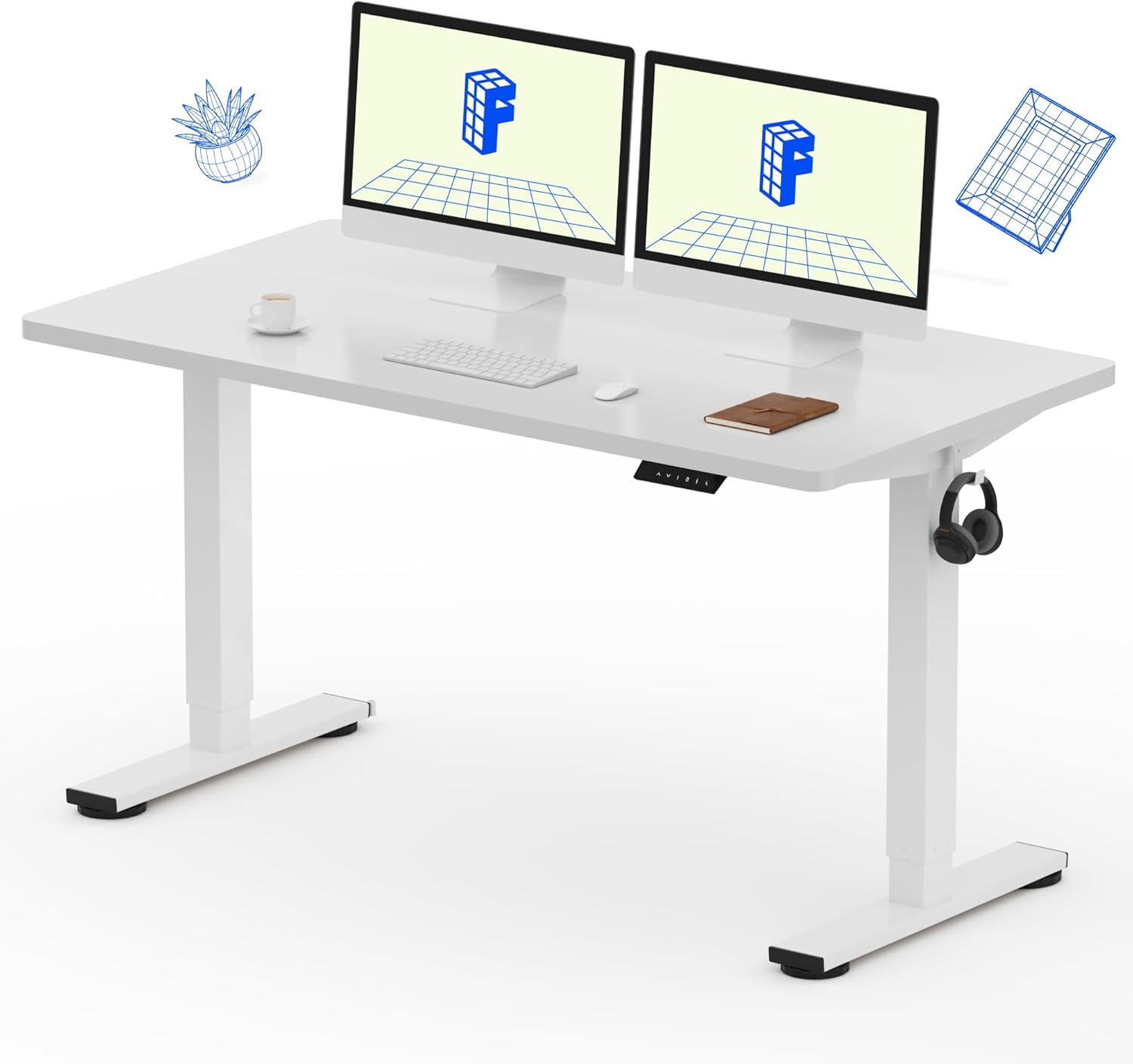
Selected listing: white top and white frame, size option 55.1 × 27.6 inches, marketed as 55 × 28 inches. Checked price: $193.79, with a Black Friday Deal badge and 19% savings against the displayed $239.99 list price.
The selected EN1 listing describes a one-piece desktop, electric adjustment, four memory presets and a 176-pound capacity. Those details apply to this specific listing; other EN1 sizes and versions can differ. The work-from-home reason to compare it is straightforward: a dedicated surface with space for your computer, controls and everyday paperwork, plus the option to change desk height.
Check before buying: measure the room, doorway and usable floor area, then check the selected model’s height range against your seated and standing setup. Count the weight of everything that will sit on the desk. Leave enough cable slack for movement and check monitor-arm clamp compatibility if you use one. Review assembly, delivery and return details for the actual seller.
Our buying take: a desk is a larger commitment than a headset. Buy it because the size and adjustment solve a workspace problem. Do not treat it as a medical solution or assume that standing all day is the goal. The listing offers optional paid assembly and haul-away services; include those only if you need them. View this FLEXISPOT EN1 desk on Amazon →
What to buy first: three focused WFH setups
Calls and everyday typing: the H390 plus MK270 totalled $38.98 at the checked prices, before tax and shipping. This pairing makes sense only if you need both and your work setup accepts their USB connections. It does not include a computer or internet service.
Video interviews and meetings: the H390 plus C920x totalled $73.98. Start with the headset if sound is the main issue. Add the camera only if your existing picture or camera position is holding you back.
Connecting a laptop at a desk: the MK270 plus Anker hub totalled $44.45. Confirm the laptop’s USB-C capabilities first. Remember that the chosen hub has no Ethernet port and its power adapter is sold separately.
You do not need all six products to work from home. If an employer supplies equipment, wait for its setup instructions. If you are still applying, check the listing’s hardware requirements before buying a computer, desk or accessories for a role you do not yet have.
A Black Friday checkout checklist worth saving
1. Match the exact variant. Check connector, color, quantity, size and condition. A multipack or renewed option can sit beside the item you intended to buy. The price above belongs to the selected version described in its section.
2. Compare the full cost. Add tax, shipping, adapters, charging equipment and assembly if applicable. A smaller product discount can still be the cheaper complete setup. Use the price in your own cart, not the total from a different delivery area or membership offer.
3. Separate a discount from a historical low. A percentage against a list price does not establish that this is the cheapest the item has ever been. Compare other sellers and available price history if that matters to your decision. This guide does not claim independently verified all-time lows.
4. Check the seller and return terms. Read who sells the selected item, who ships it and what return conditions apply. Test audio, video, pairing and ports promptly after delivery. Keep the packaging until you know the equipment fits the job.
Frequently asked questions about Black Friday WFH gear
Is Black Friday 2026 on November 27?
Yes. Retailers can start offers earlier and change them throughout the week. This guide records the Amazon listings checked November 24 rather than promising a fixed sale-end date.
Which upgrade should a remote job seeker buy first?
First check what the employer provides or requires. If a purchase is necessary, choose the item that fixes your actual limitation. Clear audio may matter more than replacing a working webcam, while a hub is useful only when you need additional compatible ports.
Can I use a Bluetooth headset for a remote customer-service job?
Only if the employer permits it and the calling system supports it. The wired H390 and Bluetooth Zone 301 are alternatives for different requirements; they are not interchangeable in every workplace.
Will the Anker hub give me a wired internet connection?
Not this selected seven-in-one model. It has no Ethernet socket. Check a different configuration if the job requires Ethernet, and verify the computer supports it.
Are these photos the actual products?
Yes. Each product section uses the photo observed on that Amazon listing and links to that product. The article cover and Pinterest artwork are generated editorial illustrations of a home workspace.
Make the upgrade serve your next move
Choose one problem, compare the relevant listing and stop when you have a setup that supports the work. For the application itself, use our Remote Mission job-search plan or our guide to emailing your résumé. A useful workspace helps you do the task; it does not have to become another task that keeps you from applying.
Which part of your WFH setup needs attention first: audio, video, connections or desk space? Save the guide for your next comparison. #wfh #NextMoveEnergy
Discover more from StayHomeHire
Subscribe to get the latest posts sent to your email.